

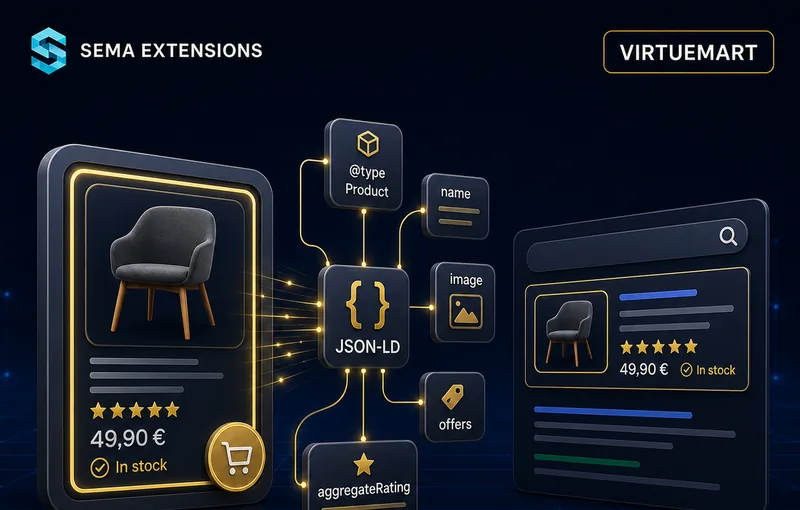
Structured Data for Better Search Results
Automatic JSON-LD Schema.org markup for VirtueMart products
Enable rich search result snippets in Google — product prices, availability, ratings and breadcrumbs — without touching a single line of code. The plugin generates JSON-LD markup automatically from your VirtueMart product data and outputs it server-side with zero impact on page load speed.
Why You Need Structured Data
With structured data
- Product prices and availability directly in search results
- Higher click-through rate (CTR) compared to plain listings
- Breadcrumb navigation shown in Google
- Optional sitelinks search box on your domain
- Better ranking signal for e-commerce queries
Without structured data
- Products appear without pricing in search results
- Lower visibility compared to competitors with rich snippets
- Lost potential customers who compare prices in SERP
- Reduced brand credibility in search listings
Supported Schema Types
Organization
Company identification on every page — name, address, tax ID and contact points. Helps Google understand who operates the website.
WebSite
Homepage markup with an optional sitelinks search box. Enables the search bar directly in Google search results for your domain.
Product + Offer
Comprehensive product data — name, description, images, SKU, GTIN-13, MPN, manufacturer, price and stock status. Powers rich product snippets in search results.
BreadcrumbList
Navigation hierarchy: Home → Category → Product. Displayed as a breadcrumb trail in Google search results.
How It Works
Install
Upload the ZIP via the Joomla Extension Installer and enable the plugin.
Configure
Enter your company details, shipping costs and return policy in the plugin settings. Enable or disable individual schema types.
Verify
Open any product page and test it with the Google Rich Results Test. The markup is already there.
Technically, the plugin captures the onAfterRender event, recognises the page type (homepage, category or product), assembles JSON-LD blocks and inserts them into <head> — all server-side, with zero front-end JavaScript.
Configuration
| Setting | Description |
|---|---|
| Company name | Used in Organization schema |
| Address (street, city, ZIP, country) | Structured address for Organization |
| Tax ID | Business identification number |
| Contact e-mail & phone | Contact points in Organization |
| Logo URL | Company logo for Organization markup |
| Currency | Any ISO 4217 code (CZK, EUR, USD…) |
| Shipping costs | Flat rate or free shipping threshold |
| Return policy | Days and conditions shown in Offer |
| Organization schema | Enable/disable |
| WebSite schema | Enable/disable |
| Product + Offer schema | Enable/disable |
| BreadcrumbList schema | Enable/disable |
| Sitelinks search box | Activate for homepage |
| Default availability | InStock / OutOfStock / PreOrder |
| Placeholder image handling | Skip or include products without images |
| Manufacturer detection | Automatic from VirtueMart manufacturer fields |
Technical Specifications
| Parameter | Value |
|---|---|
| Extension type | Joomla System Plugin |
| Compatibility | Joomla 4.x / 5.x, VirtueMart 4, PHP 8.1+ |
| Output method | Server-side JSON-LD in <head> — zero front-end JavaScript |
| Performance impact | Negligible — no additional HTTP requests |
| Localisation | Czech, English |
| Installation | Single ZIP via Joomla Extension Installer |
| Updates | Fully automatic via Joomla Updater |
| Licence | GPL v3+ |
Frequently Asked Questions
Do I need to edit my template?
No. The plugin works entirely server-side and does not require any template modifications.
Does it affect page load speed?
No. The markup is generated server-side and added to the HTML source. There are no additional HTTP requests or JavaScript files.
Do I need VirtueMart for all schema types?
Organization, WebSite and BreadcrumbList work on any Joomla site. Product + Offer requires VirtueMart product data.
How do I verify the markup?
Open any page on your site in the Google Rich Results Test or the Schema Markup Validator. The JSON-LD blocks will be shown.
Does it support multiple currencies?
Yes. Set your store currency in the plugin settings (any ISO 4217 code). The price is taken from VirtueMart and output in the configured currency.
What about products without images?
You can configure the plugin to either skip these products or include them with a placeholder. Google recommends having at least one image per product.
Does it detect manufacturers automatically?
Yes. The plugin reads the manufacturer from VirtueMart’s manufacturer fields and includes it in the Product schema.
Can I enable/disable individual schema types?
Yes. Each schema type (Organization, WebSite, Product+Offer, BreadcrumbList) has its own toggle switch in the plugin settings.
How do I set up shipping and return information?
Enter the shipping cost and return policy in the plugin settings. These are included in the Offer schema and displayed in Google’s rich results.
What happens after the one-year licence expires?
The extension continues to work indefinitely. You stop receiving updates and support. Renew any time to resume.
How it works in practice

