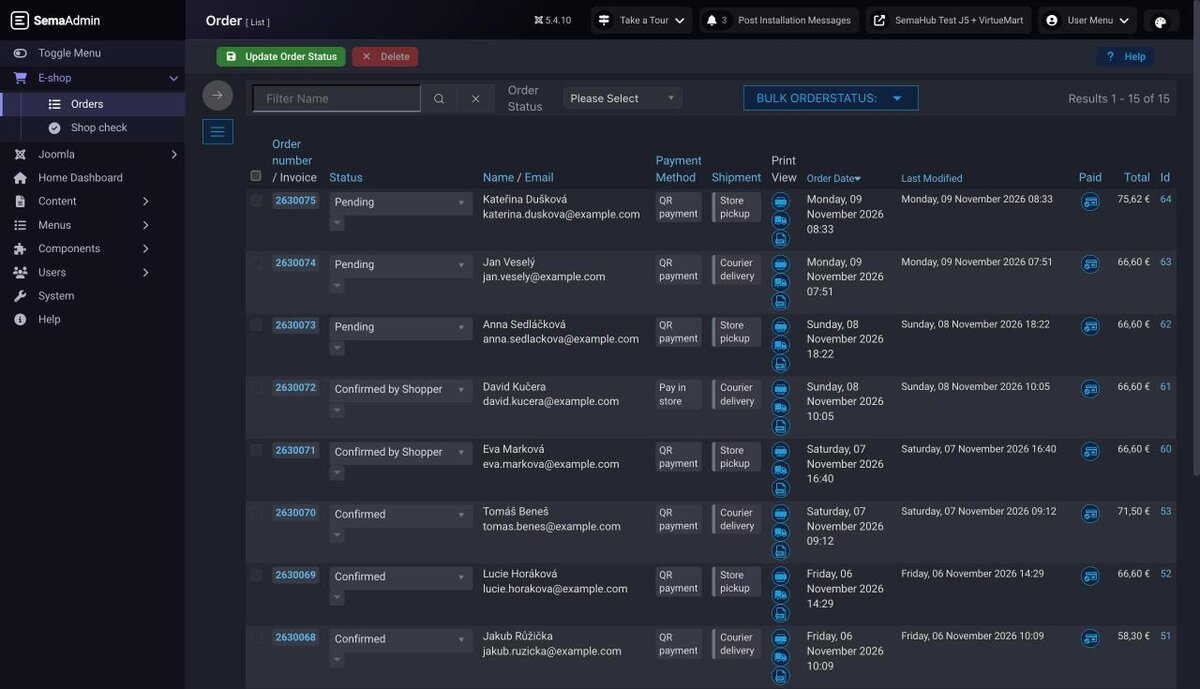
A package for the VirtueMart shop administration: the SemaAdmin administrator template with light and dark mode, a clear menu, changing shipment and payment in an order, order numbering, up-to-date invoices, a fix for the + and % characters in addresses, and a read-only Shop check that shows what needs fixing in your shop.
| Requirement | Version |
|---|---|
| Joomla | 5.3 and later 5.x |
| VirtueMart | 4.6.4 and 4.8.2 (verified), others see Compatibility |
| VirtueMart template | vmadmin with the Admin template option enabled |
| Administration mode | light, dark or follow the system |
| Current version | 1.2.0 |
1. Before you start
- The package builds on the
vmadmintemplate that ships with VirtueMart. The Admin template option must be enabled in the VirtueMart configuration, otherwise VirtueMart draws its classic look and the package look does not apply. - The package includes the SemaAdmin administrator template. Each user picks the mode (light, dark, follow the system), colour scheme and display size in the administration header under Appearance, and VirtueMart pages follow.
- The package does not modify VirtueMart core files. Each module is a separate plugin and can be turned off on its own.
2. Installing and updating
Installation: in the administration open System → Install → Extensions and upload pkg_semavmtuning-<version>.zip downloaded from semakin.cz. Installation stops and changes nothing if the site runs Joomla older than 5 or has no VirtueMart.
After the first installation the modules are set as follows:
| Module | After installation |
|---|---|
| SemaAdmin administrator template | installed, default only on the first installation (see below) |
| Administration look | on |
| E-shop menu | on |
| Changing shipment and payment | on |
| Order numbering | off |
| Up-to-date invoice after editing | off |
| Fix for + and % in addresses | on |
| Shop check | on |
Numbering and invoices stay off because they change documents. Turn modules on and configure them in System → Manage → Plugins, search for “SemaVM”.
Updates keep your choices. The default state is set only for modules that were not on the site before.
SemaAdmin template: on the first installation it becomes the default administrator template and VirtueMart stops collapsing the Joomla menu. When updating from version 1.1, or when SemaAdmin is already on the site, the default template does not change; switch it in System → Administrator Templates. If you have the standalone SemaAdmin for Joomla package, this package takes over the template with its settings; do not update the standalone package any more.
Moving from the old VM Dark Admin plugin: the new look module takes over its settings and disables the old plugin. You can then uninstall it.
The download key goes to System → Update → Update Sites, in the package entry, field Download Key.
3. Shop check
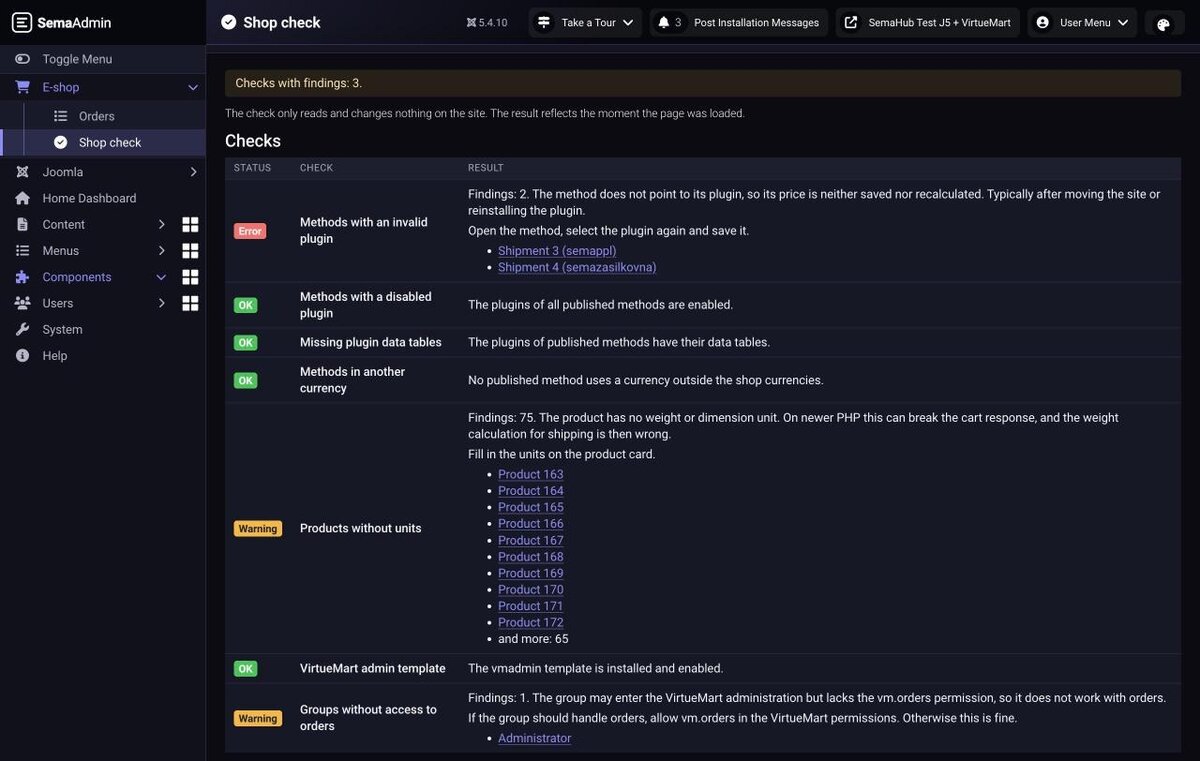
Open the page from E-shop → Shop check or from Components. It is available to users allowed to manage the component. Shop check only reads and changes nothing on the site. The result reflects the state when the page was loaded.
| Check | What it looks for | How to fix it |
|---|---|---|
| Methods with an invalid plugin | A published method does not point to its plugin, so its price is neither saved nor recalculated. Typically after moving a site or reinstalling a plugin. | Open the method, select the plugin again and save it. |
| Methods with a disabled plugin | The method is published but its plugin is disabled. | Enable the plugin or unpublish the method. |
| Missing plugin data tables | A plugin stores order data in a table that is not on the site. | Open the method and save it, VirtueMart creates the table. |
| Methods in another currency | The method's currency is not among the shop currencies, so its price may be converted differently than you expect. | Change the currency in the method, or add it to the accepted shop currencies. |
| Products without units | A product has no weight or dimension unit. On newer PHP this can break the cart response, and the shipping weight calculation is off. | Fill in the units in the product. |
| VirtueMart administration template | The vmadmin template is missing or the Admin template option is off. | Install the template from the VirtueMart package and enable the Admin template in the configuration. |
| Groups without access to orders | A group may enter the VirtueMart administration but lacks the vm.orders permission. | If the group should handle orders, allow vm.orders. Otherwise this is fine. |
Could not verify means the check could not run, not that everything is fine. The reason is in administrator/logs/semavmcheck.php.
Below the checks you find an overview of the package modules with their state, version and a link to their settings.
4. Administration look
Plugin System - SemaVM Admin: Look. It draws VirtueMart pages in the SemaAdmin look on top of the vmadmin template, so it survives VirtueMart updates. It follows the SemaAdmin mode, colour scheme and display size. It only affects VirtueMart pages.
| Option | Default | Description |
|---|---|---|
| Compact rows | Yes | Less padding in tables and toolbar buttons, more rows fit on the screen. |
| Accent colour | Cyan | Colour of links, active items and focus outlines. Applies only with the Atum template; under SemaAdmin the colour follows the colour scheme. |
| Status picker width (px) | 170 | The status picker in the order list, 120 to 400 px. Increase it when long status names wrap. |
5. E-shop menu
Plugin System - SemaVM administration. It adds an E-shop block to the left menu and collapses the Joomla menu below it.
The block contains Statistics, Orders, Withdrawals, Invoice export and Shop check. An item appears only when its component is installed and enabled and the user may manage it. Statistics, Withdrawals and Invoice export belong to separate products and are not in the menu without them.
| Option | Default | Description |
|---|---|---|
| E-shop menu | Yes | The E-shop block first, the Joomla menu collapsed below it. |
| Home = Orders | Yes | After login and on clicking the logo, the VirtueMart order list opens. The Joomla dashboard stays in the Joomla menu. |
| Simplified header | No | The top bar renders only the modules on the list. The others stay published but are not shown. |
| Header modules | mod_user, mod_cachecleaner, mod_sema_notes | Module types separated by commas. |
On a site with several administrator menu modules, the block is added only to the first one.
6. Changing shipment and payment
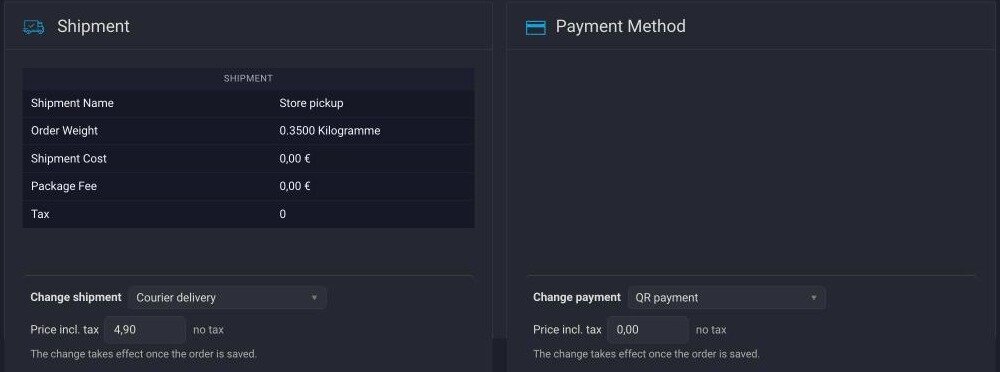
Plugin System - Sema VM Order Methods. The order detail gains Change shipment and Change payment selects. The change applies when you save the order.
| Option | Default | Description |
|---|---|---|
| Recalculate price | Yes | Calculates the price from the method settings, order weight and delivery country. When off, the original price stays. |
| Adjust order total | Yes | Adjusts the order total by the difference in the method price. |
| Keep previous method data | Yes | Keeps the original method's record in the database. With payment gateways it holds transaction data, so leaving this on is recommended. |
| Offer unpublished methods | No | Useful for seasonal or temporarily disabled carriers. |
| Record change in history | Yes | Adds a note to the status change about which method replaced which. |
| Debug mode | No | Writes the recalculation to the log. Turn on only when looking for a fault. |
The pickup point is not carried over from the original order. If the new shipment requires one, fill it in before handing the parcel to the carrier.
For a method whose plugin is missing or disabled, the price cannot be calculated. The original price stays after saving, and you can enter a different one manually.
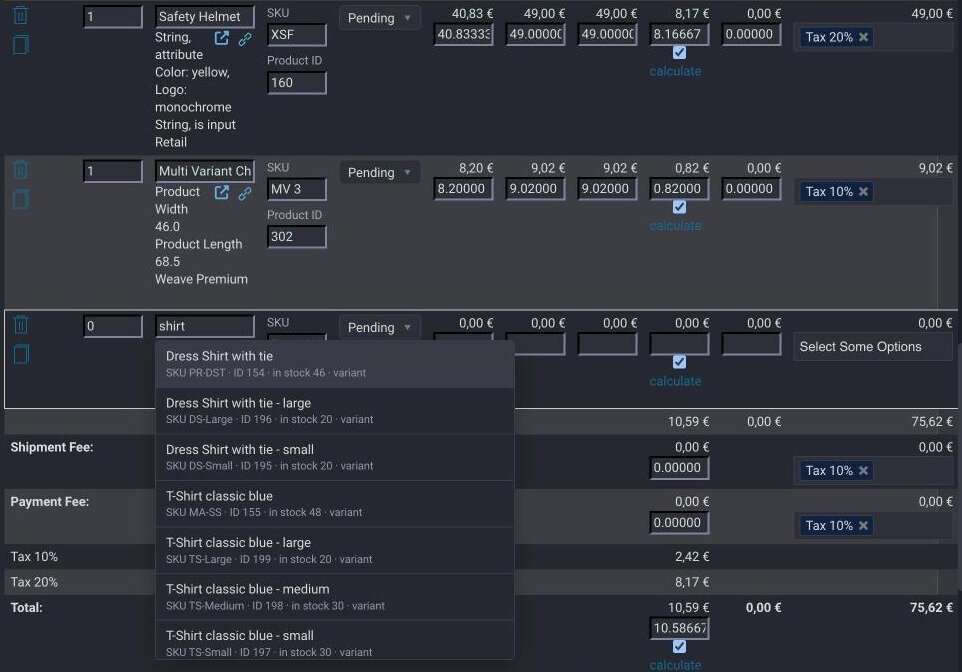
Adding a product to an order
The same plugin helps when editing order items in the order detail (Edit ordered products, New item). It needs the Shop check component enabled, which provides the search.
- Name: after at least two characters (or a numeric ID) it offers products by name, SKU and ID. Pick with the mouse or the arrow keys and Enter.
- SKU: after entering the SKU and pressing Enter (or leaving the field) it fills in the product ID. An unknown SKU is reported in red.
- After picking, the name field stays empty and the product is shown greyed out and below the field. The shop fills in the name, price and tax when you save, with prices for the order customer's shopper group, the same as at checkout.
- If you enter a price or select a tax for a new item yourself, the plugin leaves them as they are.
- For an existing item, changing the product only fills in the name; the price stays as it was.
7. Order numbering
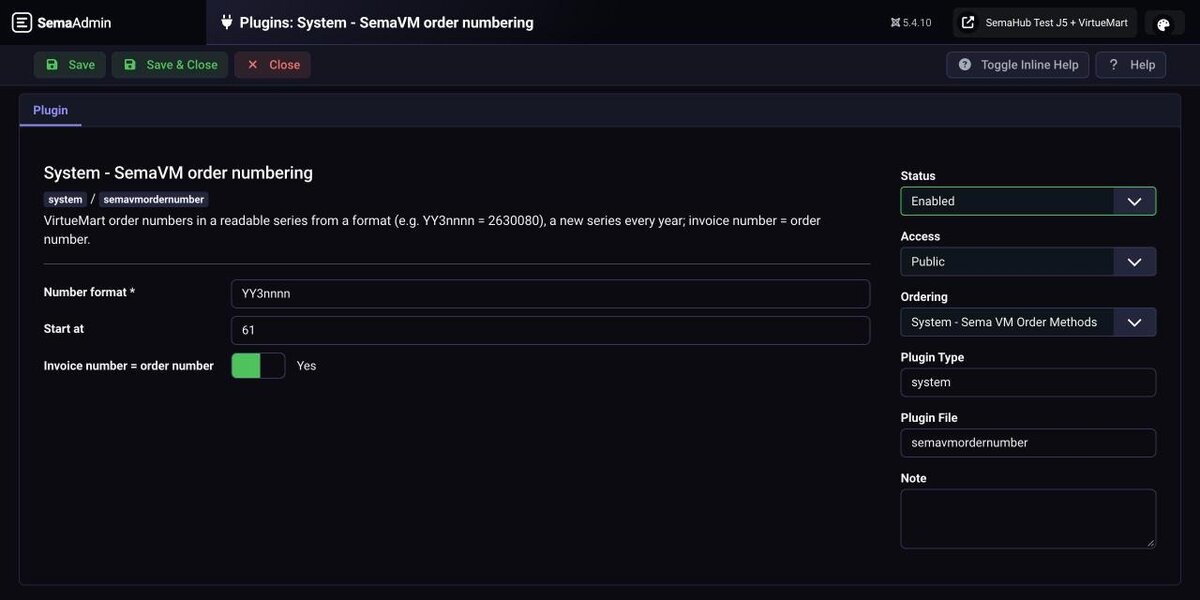
Plugin System - SemaVM order numbering, off after installation. New orders receive numbers in a readable series based on a format. Numbers of existing orders do not change.
| Option | Default | Description |
|---|---|---|
| Number format | YYnnnnn | YYYY = year, YY = two-digit year, MM = month, nnnn = sequence (number of n = number of digits), other characters stay. |
| Start at | 1 | The lowest sequence number of a new series. If higher numbers already exist in the series, it continues after them. |
| Invoice number = order number | Yes | VirtueMart still creates the invoice in the statuses set in its configuration, the plugin only gives it the order number. |
Example: format YY3nnnn gives 2630080 in 2026. The series restarts when the date part changes, here with a new year.
Before turning it on, check that the numbering does not clash with your accounting. If a number cannot be assigned, the order does not stop: VirtueMart uses its own number and the reason is written to administrator/logs/semavmordernumber.php.
8. Up-to-date invoice after editing
Plugin System - SemaVM invoice regeneration, off after installation. After you change items or the header of an order in the administration, it deletes the stored invoice and delivery note PDFs. VirtueMart recreates them from current data on the next download or email, with the same invoice number and date.
Warning: the module overwrites PDFs of invoices already issued. If you continuously pass invoices to accounting, set the Closed period protection so that documents from a closed period do not change:
| Protection | Behaviour |
|---|---|
| Off (default) | The PDF is always recreated. |
| Protect invoices from earlier months | An invoice from an earlier month keeps its original PDF. |
| Protect invoices before a set date | An invoice issued before this day keeps its original PDF. Until the date is filled in, all invoices are protected. |
For a protected invoice the administrator gets a notice, and the difference has to be handled with a corrective document. The delivery note is always recreated.
9. Fix for + and % in addresses
Plugin System - SemaVM Userfields, no settings. VirtueMart loses the + and % characters when saving an address: the phone number +420… is stored with a space and an email with + does not pass. The plugin fixes this.
It checks by itself whether the fault occurs on the site. Once VirtueMart fixes it, the plugin steps aside and writes this to administrator/logs/, so the characters are not encoded twice. It does not modify VirtueMart files.
10. Compatibility
| Environment | Status |
|---|---|
| Joomla 5.4 + VirtueMart 4.8.2, PHP 8.2 | Verified, supported |
| Joomla 5.4 + VirtueMart 4.6.4, PHP 8.1, 8.2, 8.3 and 8.5 | Verified, supported |
| Joomla 5.4 + VirtueMart 4.9.3 (beta), PHP 8.2 | The package administration works, but the VirtueMart beta has faults of its own. We do not recommend it for a live shop. |
| Joomla 6 | Tried, not supported. We have not confirmed official Joomla 6 support in VirtueMart yet. |
| Joomla 4 | Not supported, installation stops. |
VirtueMart versions older than 4.6.4 are not verified yet, nor are PHP combinations outside the table, such as PHP 8.4. PHP 8.1 is no longer supported by its authors, so we recommend moving to a newer version. PDF invoices need the TCPDF library from the VirtueMart package. After installing, run Shop check and go through the order list and order detail.
11. Troubleshooting
The look did not apply. Run Shop check. Most often the Admin template is off in the VirtueMart configuration.
VirtueMart does not match the rest of the administration. The default administrator template is not SemaAdmin. Switch it in System → Administrator Templates.
The left menu disappears on the order pages. VirtueMart closes it on its own pages. Expand it with the Joomla menu toggle.
A user sees the Orders item but the page refuses them. The group lacks the vm.orders permission. Shop check lists such groups.
An item is missing from the E-shop menu. The component is not installed or enabled, or the user may not manage it.
The invoice did not change after editing. Check that the module is on and that the closed period protection does not protect the invoice.
Shop check says Could not verify. The reason is in administrator/logs/semavmcheck.php. If it does not help, send it to us at
How it looks in practice